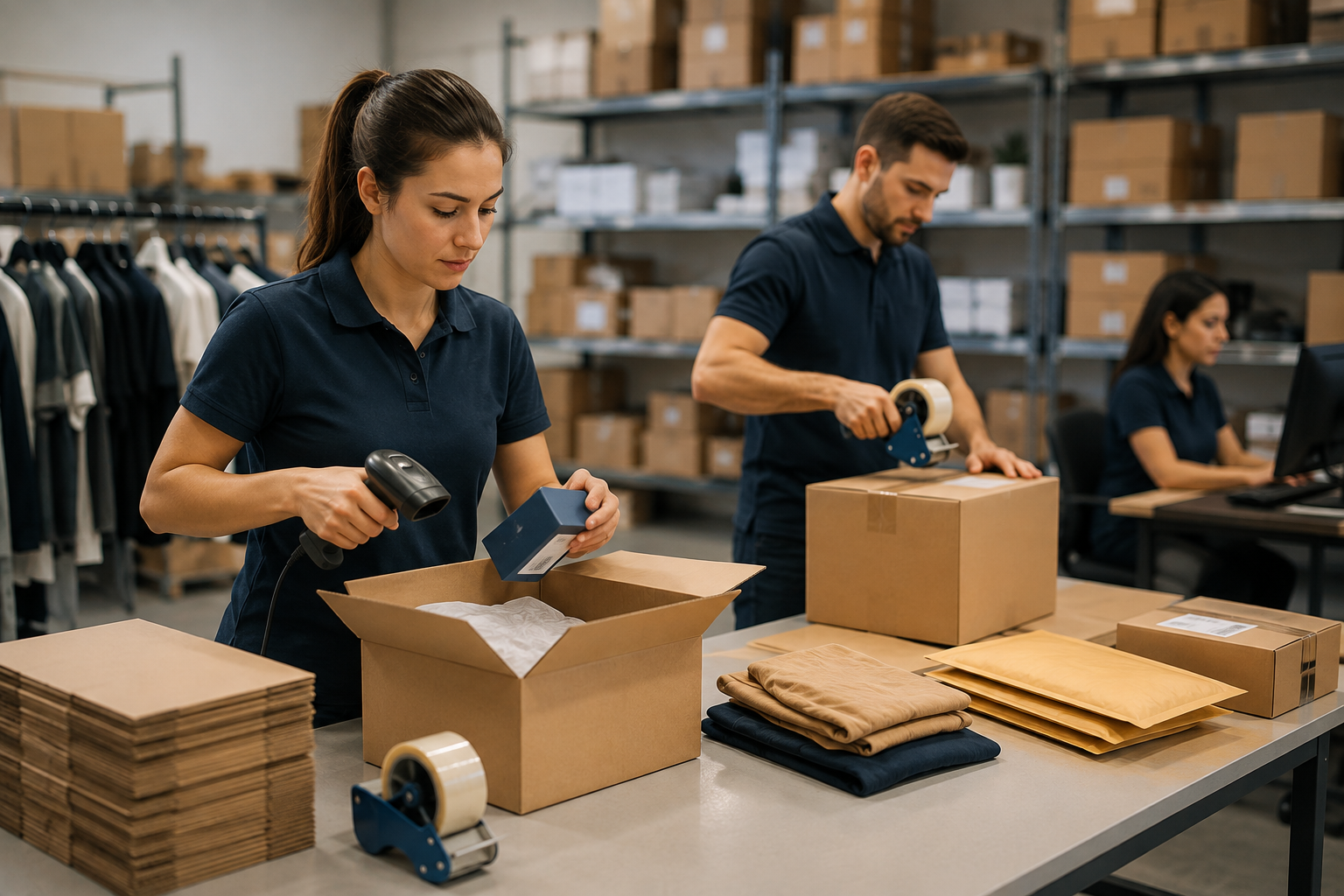

Getting a sale on Shopify is only half the job. What happens next – how quickly you check the order, get the right product off the shelf, pack it securely, and get a tracking number into your customer’s inbox – is what actually determines whether that customer comes back. This is the fulfillment side of running a store, and it’s where a lot of the day-to-day friction in ecommerce actually lives.
If you’re wondering how to fulfill orders on Shopify, the short answer is that the platform gives you the tools to mark orders as fulfilled, print shipping labels, and notify customers automatically. The longer answer is that “fulfillment” covers everything from the moment a payment clears to the moment a package lands on someone’s doorstep – and how you handle that stretch changes a lot as your store grows. This guide walks through what fulfillment means on Shopify, how to do it step by step, the different fulfillment options available to store owners, and how to build a shipping workflow that doesn’t fall apart during your busiest sales periods.
What Does Shopify Order Fulfillment Mean?
In Shopify’s system, an order moves through a few defined stages. Once a customer pays, the order is marked unfulfilled. This simply means the items haven’t been packed and shipped yet. Fulfillment is the act of preparing that order for delivery – picking the product, packing it, generating a shipping label, and handing it to a carrier – and then telling Shopify that it’s done. Once you add tracking information and mark the order complete, its status changes to fulfilled, and the customer typically receives an automatic notification with tracking details.
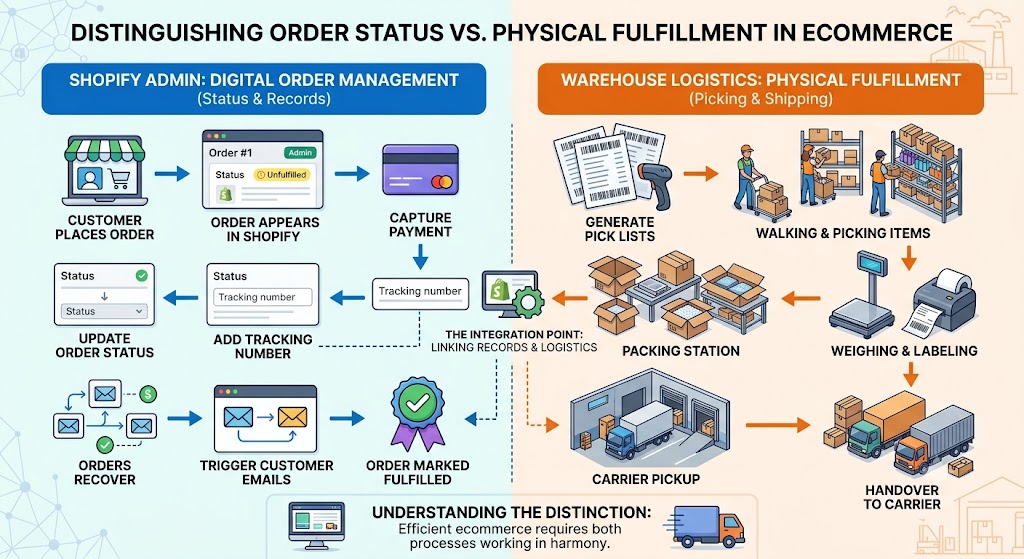
It’s worth separating two things people often lump together: order status and physical fulfillment. Shopify’s admin panel handles the status side well – it’s a clean interface for updating orders, adding tracking numbers, and triggering customer emails. But the physical side – the warehouse, the boxes, the shipping labels, the actual walking-and-picking – is not something Shopify does for you unless you’re using Shopify’s own fulfillment network or a connected app. Understanding that distinction early saves a lot of confusion, because a store’s shopify order fulfillment process is really two processes running in parallel: the digital record-keeping and the physical logistics.
For a small store shipping a handful of orders a day, these two processes can be handled by one person with a laptop and a shipping label printer. For a store doing hundreds of orders a day, they usually need to be split across dedicated staff, inventory systems, or an outside partner. Either way, the underlying mechanics stay the same.
How to Fulfill Orders on Shopify Step by Step
Whether you’re packing orders yourself in a spare room or running a small in-house warehouse, the core sequence of steps doesn’t change much. Here’s what the process looks like from the moment an order comes in to the moment it ships.
Check the Order Details
Before anything gets packed, open the order in your Shopify admin and review it. This step is easy to rush past, but it’s where a lot of avoidable mistakes get caught. Look at:
- The items ordered and quantities, so you’re not guessing at what to pull from stock.
- The shipping address, checking for anything that looks incomplete or auto-corrected incorrectly.
- Any notes the customer left at checkout – gift messages, delivery instructions, or special requests.
- Payment status, particularly if you’re using “Authorize” rather than “Capture immediately,” since an uncaptured payment means the money hasn’t actually been collected yet.
- Any fraud or risk flags Shopify has attached to the order, which are worth a second look before you ship anything of meaningful value.
Skipping this check is one of the most common reasons orders get shipped to the wrong address or with the wrong contents, so it’s worth treating as a non-negotiable first step even when you’re moving fast.
Prepare Inventory for Fulfillment
Next comes locating and reserving the stock. If you run a single warehouse or storage space, this is straightforward – you know where everything is, and Shopify automatically reduces your inventory count as items sell. Things get more complex once you’re managing multiple locations, whether that’s a warehouse plus a retail store, or two regional fulfillment hubs.
Shopify lets you assign priority to locations, so orders are automatically routed to the location closest to the customer or the one with available stock. This matters because inventory mismatches – where the website says something is in stock, but it’s actually sitting at a different location or already reserved for another order – are one of the more common sources of cancelled orders and unhappy customers. Keeping a small buffer of safety stock, rather than selling right down to zero, gives you a cushion against these kinds of sync issues, especially during high-traffic periods like a flash sale or holiday launch.
If an order includes an item that’s out of stock, you don’t have to hold the entire order hostage. Shopify supports partial fulfillment, meaning you can ship what’s available now and fulfill the rest once restocked. It’s a useful option, but keep in mind it usually means two separate shipments – and two separate shipping costs – so it’s worth weighing against simply waiting a day or two if the backorder is short.
Pick, Pack, and Ship the Order
This is the physical heart of fulfillment. A pick list (what needs to be pulled from the shelf) and a packing slip (what goes inside the box for the customer’s reference) help keep this step organized, particularly once you’re handling more than a few orders a day. For single-item orders this can feel like overkill, but as soon as you’re bundling multiple SKUs into one shipment, having a checklist reduces the chance of a mis-pick.
Packaging choice matters more than it seems. Carriers price shipments based on both weight and box dimensions, so a package that’s mostly empty space can trigger a dimensional weight charge that’s higher than the product’s actual weight would suggest. Choosing appropriately sized mailers or boxes – rather than defaulting to one box size for everything – is a simple habit that keeps shipping costs in check.
Once packed, you’ll generate a shipping label. Shopify Shipping lets you compare live rates across carriers like USPS, UPS, FedEx, and DHL directly from the order screen, so you’re not manually checking rates on each carrier’s site. For lightweight, small packages, USPS options are usually the most economical; for heavier or bulkier shipments, comparing rates across carriers before printing the label is worth the extra minute.
Add Tracking and Update the Customer
The final step is entering the tracking number and marking the order as fulfilled. Shopify automatically sends a shipping confirmation email with the tracking link once this happens, which cuts down significantly on “where is my order” questions. If you’re printing labels through Shopify Shipping, tracking numbers are usually attached automatically; if you’re using an outside carrier account, you’ll need to add the number manually.
It’s worth setting a rough internal deadline for this step – same day or next business day – since delays here are one of the more common causes of customer support tickets. A customer who paid and hasn’t heard anything for three days is far more likely to reach out (or ask for a refund) than one who got a tracking link within 24 hours, even if the package itself takes a few more days to arrive.
Shopify Fulfillment Options for Online Stores
There isn’t a single correct way to fulfill orders – the right setup depends heavily on your order volume, your product type, and how much operational control you want to keep in-house. Broadly, Shopify stores land in one of three categories.
Manual Fulfillment in Shopify
This is where almost every store starts. You store inventory yourself – often in a spare room, garage, or small office – and pack and ship each order by hand. Manual fulfillment gives you full control over quality: you see every item before it goes out, and you can personalize packaging easily, which matters a lot for handmade goods or small-batch products.
The tradeoff is time. Packing orders doesn’t scale well past a certain point – most solo founders hit a wall somewhere around 20 to 30 orders a day, after which fulfillment starts eating into the time they’d otherwise spend on marketing, product development, or customer relationships. For stores doing under roughly 100 orders a month, though, manual fulfillment is usually the most cost-effective choice, since it avoids warehouse rent, software licensing, and additional payroll entirely.
In-House Fulfillment
As order volume grows – typically somewhere in the 100 to 1,000-orders-per-month range – some stores choose to build out dedicated fulfillment operations rather than outsourcing. This might mean leasing warehouse space, hiring pick-and-pack staff, and adopting warehouse management software to keep inventory organized.
In-house fulfillment keeps you in complete control of the process, which matters for brands with complex assembly steps, specialized packaging, or strict quality control needs. The downside is overhead: rent, equipment, software licenses, and payroll all add fixed costs that exist whether you ship 50 orders or 500 in a given week. It’s a solid option for brands with the volume and the operational bandwidth to manage a team, but it’s a meaningful step up in complexity from packing orders at a kitchen table.
Third-Party Fulfillment and 3PL Options
Once volume climbs further – often somewhere past 300 to 500 orders a month, though this varies by product – many stores shift to a third-party logistics (3PL) provider. A 3PL stores your inventory in its own warehouse(s), and when an order comes in, it automatically picks, packs, and ships it on your behalf, usually integrated directly with Shopify through an app or API connection.
The appeal here is that a 3PL turns fulfillment into a variable cost rather than a fixed one – you’re not paying for warehouse space or staff during slow periods, only per order shipped. Many 3PLs also negotiate bulk shipping rates with major carriers that are lower than what an individual store could get on its own, and some offer services like kitting, custom branded packaging inserts, and subscription box assembly. Distributed 3PL networks can also place your inventory across multiple regional warehouses, which shortens delivery times and lowers shipping zones for customers spread across the country.
The tradeoff is a loss of direct oversight – you’re trusting another company to represent your brand’s packing and shipping experience, which is why choosing a 3PL with strong accuracy rates and good communication matters more than picking the cheapest option available.
| Fulfillment Option | Typical Order Volume | Overhead | Control Level |
|---|---|---|---|
| Manual (self-fulfillment) | 0-100 orders/month | Low | Full control |
| In-house warehouse | 100-1,000+ orders/month | High (rent, staff, software) | Full control |
| Third-party (3PL) | 300+ orders/month | Low fixed, variable per order | Partial oversight |
Shopify Shipping and Fulfillment Workflow
The steps above describe what happens to a single order. The workflow question is different: what breaks when you’re not handling one order, but forty of them arriving at the same time on a Monday morning? A shopify shipping and fulfillment workflow is really about consistency at volume – the same checks, in the same order, whether it’s your first sale of the day or your fiftieth, and whether you’re the one packing it or an employee is.
At low volume, consistency is easy because one person holds the whole process in their head. It breaks down once more than one person is involved, or once order counts climb high enough that steps start getting skipped under time pressure. That’s the point where workflow tooling starts to matter more than the process itself:
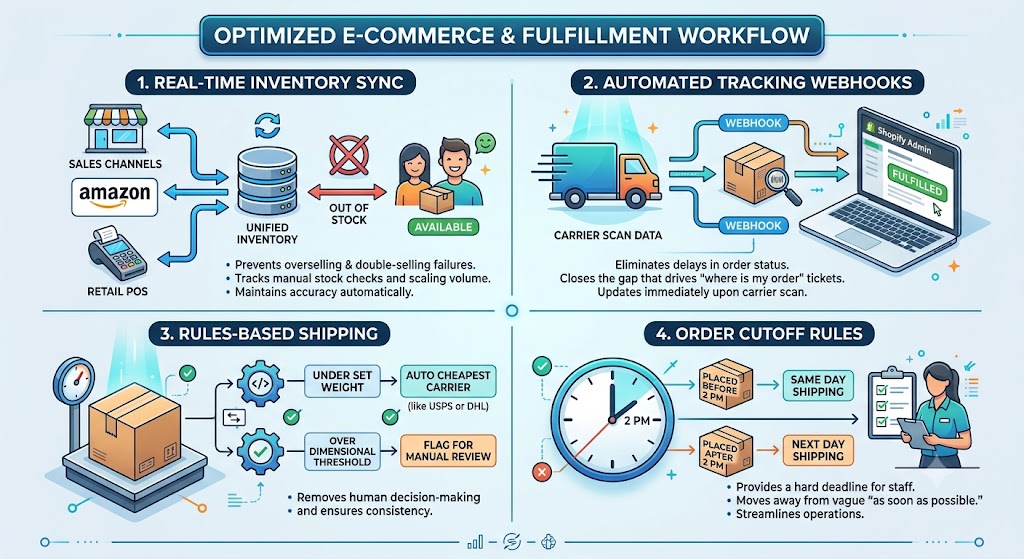
- Real-time inventory sync across sales channels (Shopify, Amazon, retail POS) prevents the specific failure mode of selling something twice – a problem that doesn’t show up until volume is high enough that manual stock checks can’t keep pace.
- Automated tracking webhooks push carrier scan data straight into Shopify, so “fulfilled” status updates the moment a package is scanned rather than whenever staff get around to entering it – closing the gap that drives most “where is my order” tickets.
- Rules-based shipping (e.g., automatically defaulting to the cheapest carrier under a set weight, or flagging anything over a dimensional threshold for manual review) removes a decision that would otherwise be made – inconsistently – dozens of times a day by whoever is packing.
- Order cutoff rules (e.g., anything placed before 2 PM ships same day) give staff or a fulfillment partner a hard deadline to work against, rather than a vague “as soon as possible.”
None of these tools change what fulfillment is; they change how reliably it happens once a store outgrows the point where one careful person can hold the entire process in their head.
Shopify Fulfillment Process: Common Mistakes to Avoid
A handful of recurring issues tend to account for most of the margin loss and customer complaints in ecommerce fulfillment:
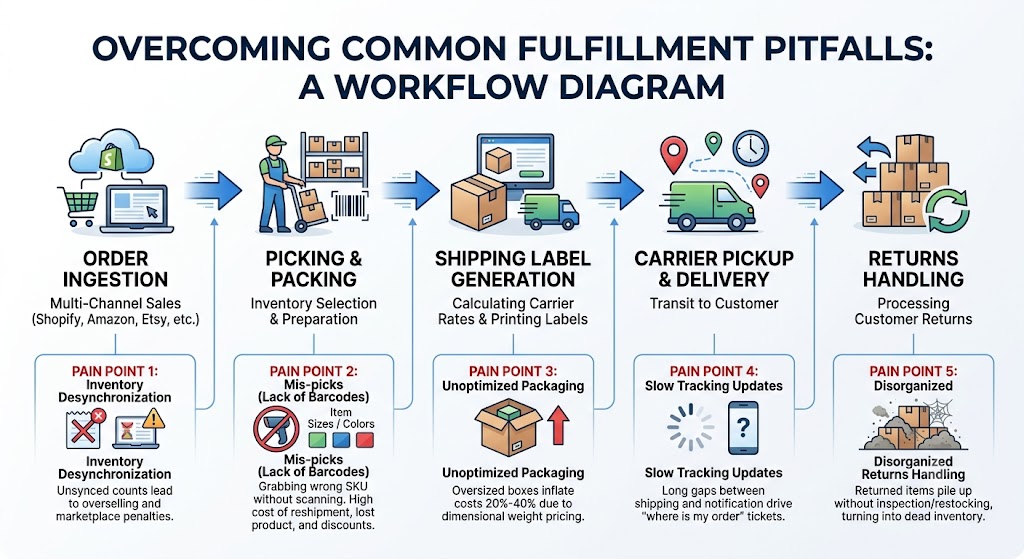
- Mis-picks from a lack of barcode verification. Without a scanning step, it’s easy to grab the wrong size, color, or SKU. A single mis-pick doesn’t just cost the reshipment’s postage – it usually means eating the cost of the first shipment, the corrected shipment, and often a refund or discount to smooth over the customer’s experience, which can add up to several times the product’s original margin on that order alone.
- Inventory desynchronization across channels. If you sell on Shopify and a marketplace like Amazon or Etsy simultaneously, unsynced inventory counts lead to overselling and cancelled orders – and on some marketplaces, penalties against your seller account.
- Unoptimized packaging. Oversized boxes for small items routinely inflate shipping costs by 20% to 40% due to dimensional weight pricing, even when the product itself is light.
- Slow tracking updates. Long gaps between shipping and tracking notification are one of the biggest drivers of “where is my order” support tickets.
- Disorganized returns handling. Returned items that pile up without a clear inspection and restocking process quietly turn into dead inventory, taking up space and value without ever getting resold.
Each of these is fixable with fairly small process changes – a scanning step, a sync tool, better box sizing – but they’re worth auditing periodically, since they tend to creep back in as order volume grows and shortcuts start to feel necessary.
When Should a Shopify Store Improve Its Fulfillment Setup?
There’s no single order count that signals “time to switch,” but a few practical warning signs tend to show up consistently:
- Fulfillment is eating your time. If you or your team are spending more than a couple of hours a day packing orders, that’s time not spent on product development, marketing, or customer relationships – the parts of the business that actually drive growth.
- Shipping turnaround is slipping. If orders regularly take more than 24-48 hours to leave your hands, especially during busy periods, customers will notice and it will show up in reviews.
- Shipping costs are creeping up. Paying retail carrier rates instead of negotiated commercial rates becomes a real drag on margins once volume increases.
- Error rates are climbing. If mis-picks or wrong shipments start exceeding roughly 1% of orders, it’s usually a sign that manual, paper-based processes have outgrown their usefulness.
The math behind that first point is worth spelling out, because it’s what actually forces the decision. Packing a single order – pulling the item, boxing it, printing and applying a label – takes roughly 5 to 8 minutes even when someone is fast at it. At 100 orders a month, that’s under 10 hours of labor across the whole month, easily absorbed alongside everything else a founder is doing. At 500 orders a month, the same math is 40 to 65 hours – a full extra work week spent packing boxes instead of running the business. At 1,000+ orders a month, it’s the equivalent of a full-time role that doesn’t yet exist on the org chart. The order count where fulfillment quietly becomes a full-time job is lower than most store owners expect, which is why it’s worth running this math against your own numbers rather than waiting for the workload to become obviously unmanageable.
Tracking a few simple metrics makes these signals easier to spot before they become serious problems: order accuracy rate, average fulfillment cycle time (from order placed to carrier pickup), and cost per order (total fulfillment cost divided by number of orders shipped). When these numbers start trending in the wrong direction, it’s usually a sign that it’s time to move from manual fulfillment toward an in-house team or a 3PL partnership – not necessarily because volume alone demands it, but because the current setup is starting to cost more in time, errors, or shipping fees than a better setup would.
FAQ
How do you fulfill orders on Shopify?
Open the order in your admin, pack the items, and generate a label – then add the tracking number and click “Fulfill items.” Shopify handles the customer notification automatically once that’s done. The section above walks through where mistakes typically creep into that sequence.
What are Shopify fulfillment options?
Stores generally choose between three approaches: manual fulfillment, where you pack and ship orders yourself; in-house fulfillment, where you run a dedicated warehouse and staff; and third-party fulfillment (3PL), where an outside company stores your inventory and handles picking, packing, and shipping on your behalf, usually connected to your store through an app or API integration.
What is the Shopify order fulfillment process?
It’s the sequence of steps that takes an order from payment to delivery: verifying order details, allocating inventory, picking and packing items, generating a shipping label, and adding tracking information before marking the order fulfilled. Shopify handles the record-keeping and status updates automatically, while the physical picking, packing, and shipping is handled either by the store owner, in-house staff, or a fulfillment partner.
Can Shopify stores use a 3PL for fulfillment?
Yes. Most 3PLs integrate with Shopify directly through the App Store or an API connection, letting orders flow automatically from your store into the 3PL’s warehouse system. Once integrated, the 3PL handles storage, picking, packing, and shipping, and pushes tracking information back into Shopify so order statuses and customer notifications update without manual work on your end.