

Ecommerce fulfillment covers everything that happens between a customer clicking “buy” and a package landing on their doorstep: receiving inventory, storing it, picking and packing orders, shipping them out, and handling whatever comes back. It’s easy to file this under back-office logistics, but for most growing online sellers it’s where the business actually succeeds or fails. Marketing can drive traffic and win a sale, but fulfillment decides whether that sale turns into a repeat customer, a returned package, or a suspended marketplace account.
That distinction matters more as volume grows. A founder shipping fifteen orders a day out of a spare bedroom can absorb an occasional mis-pick or late label without much damage – a quick apology email and a reshipped item usually smooths things over. A brand shipping fifteen hundred orders a day cannot afford that same margin of error, because the same error rate multiplied across volume turns into a flood of support tickets, chargebacks, and one-star reviews that are far harder to walk back.
This matters just as much for sellers who’ve outsourced the physical work as for those still packing boxes themselves. Even with a warehouse partner handling day-to-day execution, someone on the brand side needs to understand how the pieces fit together well enough to spot a problem, question a metric, or evaluate a new provider – outsourcing the labor doesn’t mean it’s safe to outsource the understanding.
How Does Ecommerce Fulfillment Work?
Fulfillment runs as a connected sequence of physical handling stages, each one feeding the next. A weak link at any single stage tends to surface as a problem two or three stages later, which is part of why fulfillment failures are often harder to diagnose than they should be.
Receiving Inventory
Inbound inventory – a full ocean container, a pallet shipment, or a handful of boxes from a domestic supplier – gets unloaded, checked against the purchase order, and inspected for damage. Staff verify unit counts, confirm the shipment matches what was ordered, and check for anything damaged in transit. Discrepancies should be flagged immediately with photo documentation, since disputing a shortage two weeks later is a much harder conversation than catching it at the dock while the freight carrier is still accountable for it. For sellers working with overseas suppliers, this stage is also where import paperwork gets reconciled against the physical shipment, which matters just as much as the unit count itself.
Storing Products in a Warehouse
Once inventory passes inspection, each unit is scanned into the warehouse management system (WMS) and assigned a storage location. Well-run facilities place high-velocity SKUs closer to packing stations and push slow movers to less accessible racking – a slotting decision that sounds minor on paper but adds up to real labor savings once a facility is picking hundreds of orders a day. Getting this step wrong doesn’t just waste warehouse space; it slows down every pick that touches a poorly placed SKU, and it compounds as SKU count grows, since a disorganized facility gets proportionally slower with every new product line added.
Picking and Packing Orders
When an order syncs from the storefront, staff retrieve items along a pick path generated by the WMS, scanning each barcode to confirm it matches the order. Batch and zone picking – grouping several orders together by warehouse zone – lets a single picker fulfill multiple orders in one pass rather than walking the floor separately for each one. Orders involving bundles, multi-packs, or subscription boxes go through an additional kitting step – combining components, adding inserts, following brand-specific presentation rules – before being treated as a single sellable unit; a mis-assembled kit is functionally the same failure as a mis-pick, just harder to catch after the fact. From there, items go into appropriate packaging, from simple poly mailers to branded unboxing setups with tissue paper and custom inserts, and a shipping label is generated and cross-checked against the contents before the box is sealed. Fragile or high-value items typically get additional protective dunnage at this stage.
Shipping Orders to Customers
Once a package is packed and labeled, it moves to carrier staging. Most fulfillment operations of any real scale use rate-shopping software that automatically compares carriers – USPS, UPS, FedEx, DHL, and regional couriers – based on destination zone, transit time, and dimensional weight, rather than defaulting to one carrier for every shipment regardless of cost. Dimensional weight pricing in particular catches a lot of sellers off guard: a lightweight but bulky item can cost more to ship than a smaller, denser one, which is part of why packaging choices matter for shipping cost, not just presentation. Tracking numbers sync back to the storefront and out to the customer automatically, usually by email or SMS, closing the loop between purchase and delivery without requiring manual follow-up from support staff.
For orders crossing an international border, this stage also involves customs declarations and, depending on the destination, duty collection either at checkout or on delivery. Sellers who calculate and disclose these costs up front tend to see far fewer refused deliveries than those who let the carrier surprise the customer with a bill later in transit.
Handling Returns and Inventory Updates
Reverse logistics is often the weakest link in an otherwise solid setup, largely because it gets less design attention than the outbound side. A returned item has to be received, matched to its original order, inspected, and sorted – typically into something like resellable as new, resellable at a discount, or not resellable at all. Items in the first category get relabeled and put straight back into active inventory; items in the second often move to a discounted or outlet sales channel; items in the third are salvaged for parts, liquidated, or disposed of responsibly. Whatever the outcome, the inventory count needs to update across every connected sales channel quickly, or the business risks selling a unit that no longer physically exists in stock – which just creates a second customer service problem on top of the original return.
Beyond the logistics, returns carry a real financial cost that’s easy to underestimate: every unit sitting in a return queue is capital that isn’t generating revenue, and every day it takes to grade and restock it extends how long that capital stays tied up.
Ecommerce Fulfillment Process Step by Step
Condensed to a single reference list, the physical process breaks into six checkpoints:
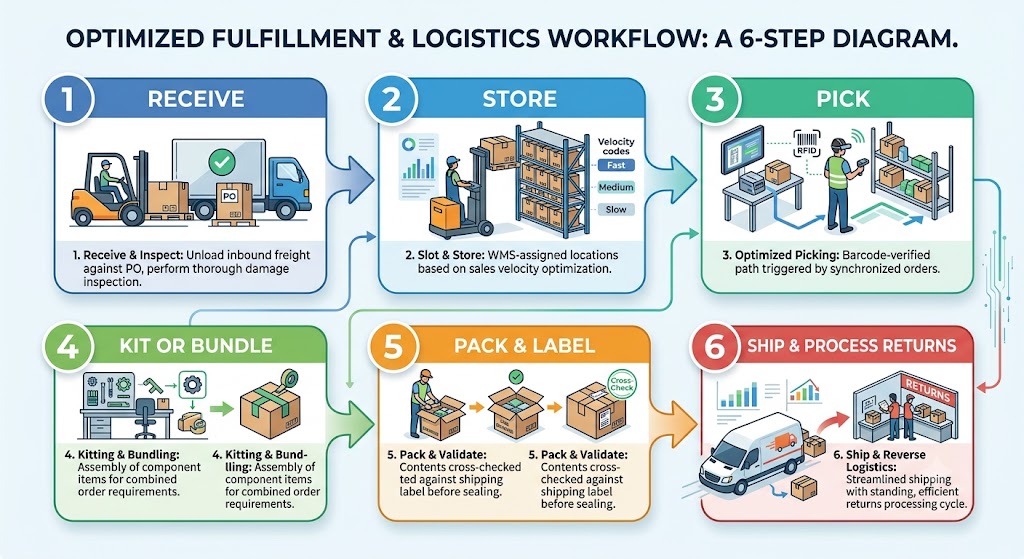
- Receive inbound freight against the purchase order and inspect for damage.
- Store each unit in a WMS-assigned location, slotted by sales velocity.
- Pick items along a barcode-verified path once an order syncs in.
- Kit or bundle components where an order requires assembly.
- Pack and label the order, cross-checking contents against the shipping label.
- Ship and process returns, treating reverse logistics as a standing part of the cycle rather than overflow work handled when there’s spare time.
Each checkpoint depends on the accuracy of the one before it, which is why an error introduced early – a miscounted receiving shipment, a mis-slotted SKU – tends to be the most expensive to trace and fix once it surfaces further down the line.
Ecommerce Fulfillment Workflow: What Happens After an Order Is Placed?
Where the section above covers the physical handling of goods, the workflow underneath it is a data problem: keeping every system that touches an order in sync from the moment it’s placed to the moment it’s delivered.
Once a customer completes checkout, the order doesn’t sit and wait – it triggers an automated sequence connecting the storefront to the warehouse floor. Order details sync from the sales channel (Shopify, WooCommerce, Amazon, Walmart) into the 3PL’s WMS within minutes via API, and stock is immediately reserved against that order so the same unit can’t be sold twice across different channels at once. From there, the WMS groups pending orders into pick waves, routes warehouse staff using handheld scanners, and confirms every item against its barcode before it reaches the packing station. A well-integrated setup means a customer’s order status updates automatically at each of these checkpoints, without anyone on staff manually touching the storefront.
For a seller running several sales channels at once, this synchronization is what prevents one of the more painful operational failures: accepting an order for a product that’s technically already sold out. Without a live feed between the warehouse floor and every storefront, stock counts drift out of alignment within hours, not days, once order volume picks up – and by the time someone notices, there are usually several oversold orders already sitting in the queue waiting to be apologized for.
This workflow rarely runs on a single piece of software. A typical setup layers a warehouse management system for inventory and picking, an order management system (OMS) that consolidates orders across every sales channel into one queue, and shipping software that handles labels, rates, and tracking. When these three pieces are properly integrated, an order can move from “placed” to “shipped” without a single manual data entry step; when they’re stitched together loosely or updated by hand, that’s usually where delays and stockouts start creeping in.
Ecommerce Fulfillment Best Practices for Growing Online Stores
A handful of operational habits separate fulfillment setups that scale smoothly from ones that quietly accumulate errors as order volume climbs. None of these are exotic – most are just a matter of building the right checks into the process before volume makes the lack of them expensive. The businesses that struggle most tend not to be missing any single piece of software; they’re missing the discipline to use what they already have consistently.
Keep Inventory Data Accurate
Manual spreadsheets and end-of-day updates are a reliable source of overselling, because there’s always a gap between when a sale happens and when the spreadsheet catches up. Continuous API syncing between the WMS and every sales channel closes that gap by updating stock levels the moment an order is placed, reserved, or shipped. Perpetual cycle counting – frequent spot-checks of high-velocity SKUs rather than one exhausting annual count – tends to catch discrepancies faster and with far less operational disruption than a full physical inventory shutdown.
Reduce Picking and Packing Errors
Requiring a barcode scan at receiving, putaway, picking, and packing creates a paper trail that makes it possible to trace exactly where an error entered the process, rather than guessing after the fact. Double-scan verification – scanning both the bin location and the item before it goes into the pick cart – is a simple control that measurably reduces mis-picks, since it catches the two most common failure points (wrong bin, wrong item) independently. Organizing the warehouse layout around product velocity, sometimes called ABC analysis, also shortens pick paths for top-selling items and reduces the physical distance a picker covers per order.
Use Clear Shipping Rules and Carrier Options
Automated multi-carrier rate comparison, combined with regional routing rules that favor ground networks over air shipping where possible, is one of the more reliable ways to cut shipping cost without changing anything about the product itself. Clear rules also prevent staff from defaulting to whichever carrier is fastest to select in the software rather than most cost-effective for that particular destination and package size. For international orders, clear rules extend to customs documentation and duty handling, since an incomplete declaration is one of the more common reasons a package gets delayed at the border.
Track Fulfillment Performance Metrics
A few numbers tend to predict problems well before they become customer-facing complaints:
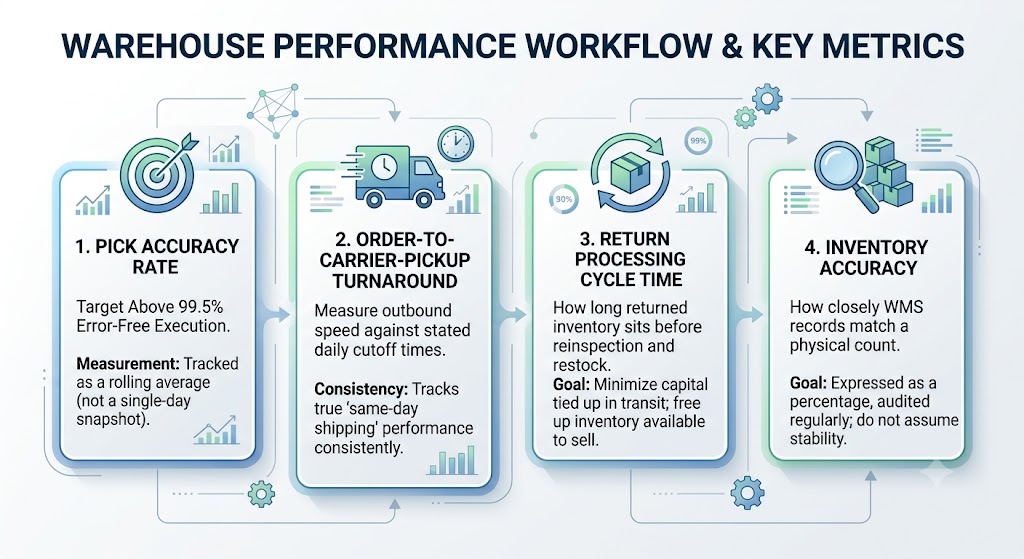
- Pick accuracy rate – a reasonable target is above 99.5% error-free execution, tracked as a rolling average rather than a single-day snapshot.
- Order-to-carrier-pickup turnaround – measured against your stated daily cutoff time, since “same-day shipping” only means something if it’s measured consistently.
- Return processing cycle time – how long returned inventory sits before it’s reinspected and restocked, which directly affects how much capital is tied up in transit rather than available to sell.
- Inventory accuracy – how closely WMS records match a physical count, usually expressed as a percentage and worth auditing regularly rather than assuming it stays stable.
Tracking these consistently, rather than only investigating after a customer complaint, is what turns fulfillment from a reactive function into a genuinely manageable one.
When Should an Online Store Improve Its Fulfillment Process?
A setup that works fine at low volume often stops working long before anyone officially notices, because the early symptoms tend to look like isolated incidents rather than a systemic problem. By the time the pattern is obvious in aggregate metrics, it’s usually already cost the business a meaningful number of customers. A few signals worth watching for:
- Staff time is increasingly consumed by packing boxes instead of driving sales, marketing, and product growth – a sign the operation has outgrown ad hoc handling.
- Shipping errors or delays are frequent enough that customers are commenting on them unprompted, rather than the occasional isolated complaint.
- Expanding onto a marketplace like Amazon is exposing the business to compliance requirements the current process wasn’t built for – proper FBA prep, ASIN/FNSKU labeling, and packaging that meets Amazon’s inbound rules, where a single mistake can trigger a rejected shipment or listing suspension.
- Returns are piling up faster than they’re being processed, tying up capital in inventory that isn’t back on the shelf and isn’t generating revenue.
- A seasonal demand spike, or a successful new product launch, would genuinely overwhelm current capacity rather than simply stress it for a few days.
None of these are reasons to panic, but they’re reasons to look seriously at either building more structure internally – better software, clearer SOPs, dedicated staff – or bringing in a third-party logistics partner with the systems already in place. Waiting until the breaking point tends to be more expensive, and more disruptive to customers, than addressing it a season early.
The right answer isn’t the same for every seller. A brand doing a few hundred orders a week with distinctive packaging as part of its identity may reasonably keep fulfillment in-house even after hitting some of these signals, simply investing in better tools and process. A seller pushing several thousand orders a week, or one expanding into marketplace compliance requirements they’ve never had to meet before, is more likely to find that a 3PL’s existing infrastructure – negotiated carrier rates, established compliance workflows, flexible seasonal staffing – is cheaper and more reliable than replicating it internally from scratch.
None of this applies universally, though, and it’s worth being clear about where it doesn’t. A seller doing under fifty orders a week rarely recovers the cost of a standard 3PL relationship – minimum monthly commitments and per-order fees can end up costing more than simply packing orders by hand a few times a week. A single oversized, hazardous, or otherwise non-standard product line often can’t be handled by a general-purpose warehouse at all, regardless of order volume, and needs a specialist facility instead. And a seller whose model depends on same-day hyperlocal delivery within one metro area usually isn’t well served by a standard fulfillment network built around zone-based carrier shipping – that’s a different kind of logistics problem entirely.
FAQ
What is ecommerce fulfillment?
It’s the full operational process of managing inventory, storing goods, and turning completed orders into delivered packages – receiving, storage, picking, packing, shipping, and handling returns. It’s worth noting this is an operational discipline, not just a shipping method: a store can outsource the physical labor to a warehouse partner and still be responsible for understanding how the pieces connect well enough to catch a problem before a customer does.
How does ecommerce fulfillment work?
Once a customer checks out, the order flows into a warehouse management system, which drives barcode-verified picking and packing, generates a shipping label, and hands the package to a carrier, with tracking data flowing back to the customer automatically throughout. The entire sequence is designed to run without manual intervention from order placement through delivery confirmation.
What are the main steps in the ecommerce fulfillment process?
Receiving and storage, order picking, kitting or bundling where relevant, packing and labeling, carrier shipping, and reverse logistics for anything that gets returned. Each step depends on the accuracy of the one before it, which is why errors early in the sequence tend to be the most expensive to fix later on.
What are ecommerce fulfillment best practices?
Keeping inventory data synced in real time, enforcing barcode verification at every handling stage, using clear multi-carrier shipping rules, and tracking core performance metrics like pick accuracy and return cycle time. Together, these form less a checklist than an ongoing discipline – the goal is catching small errors before they compound into larger, customer-facing ones.